PikPik · Guide
How to Check Pokémon Card Value (Scan or Search)
Two cards with the same Pokémon can be worth $1 or $500. Here's what decides the price, how to check it for free, and how to scan a whole stack with your iPhone.
On this page7 sections
Quick answer
Find the card's exact version — name, set, collector number, finish, language and condition — then check what that version has recently sold for. Free: search sold listings by name and number. Faster: scan the card with PikPik and see its US or EU market price, with the date it was last updated.
- The collector number (e.g. 025/165) tells you the exact card.
- Free: compare recent sold listings, not asking prices.
- Fast: scan a stack in PikPik and see the total.
What decides a card’s price
«How much is my Charizard worth?» has no single answer — there are many Charizard cards. A price only makes sense for one exact version of a card, and these are the things that set it:
| What to check | Where to look | Why it matters |
|---|---|---|
| Name & set | Set symbol | Reprints of the same Pokémon differ a lot |
| Collector number | Bottom corner | e.g. 025/165 — the exact card |
| Finish | Holo, reverse holo… | Each finish has its own price |
| Rarity | Symbol by the number | Secret and special rares cost more |
| Condition | NM · LP · MP · HP · DMG | Whitening and creases lower it |
| Language | Card text | English, German, Japanese… sell differently |
Graded cards — sealed in a plastic slab with a grade — are a separate market and usually sell for more than the same card raw.
Method 1 — Free: look it up by hand
This takes a few minutes per card, but it works for any card and costs nothing.
Step 1: Write down the exact card
Name, collector number (e.g. 025/165), set, finish and language. Look at the corners, edges and surface under a light, and be honest about the condition.
Step 2: Search recent sold listings
On a marketplace, search the name plus the collector number, then use the filter that shows only sold (completed) listings. Asking prices tell you what sellers hope for; sold prices tell you what buyers paid.
Step 3: Compare like with like
Ignore graded slabs, lots and different finishes. Take the middle of 5–10 recent sales in a similar condition — not the highest one.
Step 4: Check the date
Prices move, especially after a new set comes out. A sale from last week means more than one from last year.
Method 2 — PikPik: scan or search
PikPik recognises a card with your iPhone’s camera and shows its market price for the US market (USD) or the EU market (EUR), with the time it was last updated.
Step 1: Scan the card
Tap the scan button and point the camera at the card. In about a second its name and price appear right under it. Keep going — each card joins the row at the bottom and the total grows.
Fig. 1 — Name and price under the card
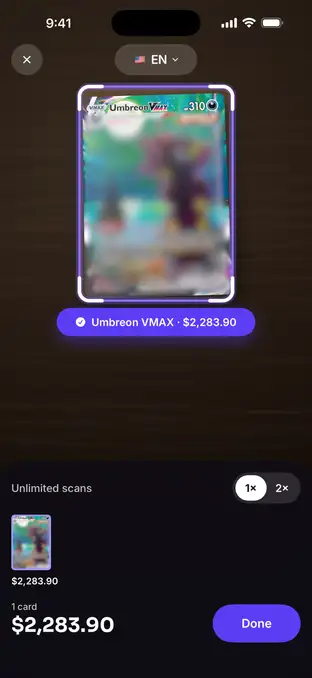
Fig. 1 — Name and price under the card
Step 2: Check every match
Tap Done to review the stack: each scan sits next to the card it matched. Set the finish and quantity; if a match is off, tap «Not this card?» and pick from similar cards, or search by hand.
Fig. 2 — Review: scan next to match
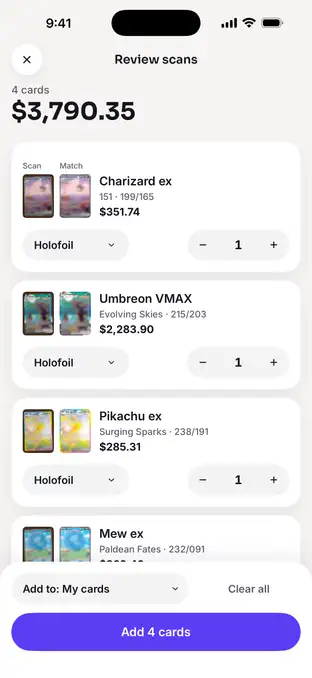
Fig. 2 — Review: scan next to match
Step 3: Open the price history
Tap a card to see its price chart and the change over 30 days, for the US or EU market. Prices follow your price region (US or EU) — both markets are free since version 2.0.1. Free history covers 7 days to 6 months; 1 year, all time and the full price range are Premium.
Fig. 3 — Price history, US or EU market
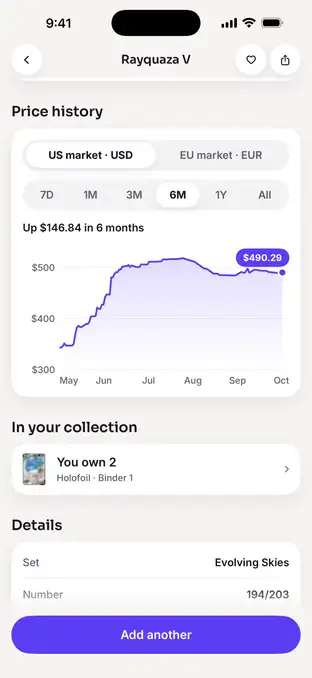
Fig. 3 — Price history, US or EU market
Step 4: Add them to your collection
Add the cards to My cards and see what the whole collection is worth on a chart, with a dashed line for what you paid.
Fig. 4 — Collection value over time
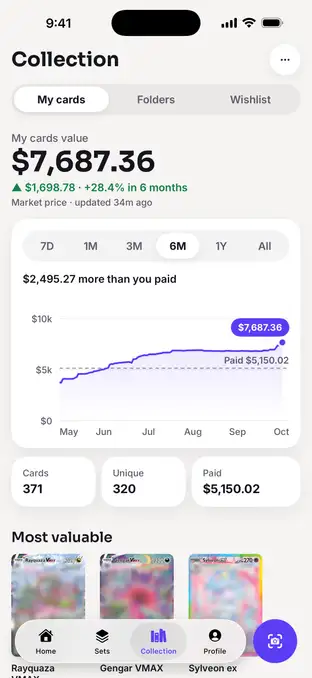
Fig. 4 — Collection value over time
No camera nearby, or a damaged card? Use Search: type the name or the collector number and pick the card from the results.
Typical numbers
These are typical values, not a timed test on one binder. The by-hand numbers come from the method above; PikPik’s come from the app’s own recognition benchmark and its published limits.
| Method | Per card | What you get |
|---|---|---|
| By hand · sold listings | 5–10 sales | The middle of recent sales for your exact version |
| PikPik scan · recognition | ≈ 1 s | Name and market price under the card (median ≈ 1.1 s in our benchmark) |
| PikPik free plan | 10 scans | Then 3 a day; Search has no limit |
Sources: PikPik 2.0 recognition benchmark (median ≈ 1.1 s per card), the PikPik App Store description («recognises it in about a second») and the app’s free-plan limits. Market prices are a typical recent price for the card, not an offer for your copy.
Troubleshooting
Card not recognised?
Lay it flat on a plain, darker surface, avoid glare on holo cards and move a little closer. Or search by the collector number.
Wrong version matched?
Same Pokémon, different set? Compare the collector number, then tap «Not this card?» and pick the right one from similar matches.
Non-English card?
Set the card language with the chip in the scanner. The scanner also tries the other supported languages on its own. Japanese cards aren't supported yet.
Old prices showing?
Prices need the internet. Offline, PikPik shows the last prices with their age — reconnect to refresh them.
FAQ
How accurate are card price apps?
They show a market price — a typical recent price for that exact card — not what you'll get for your copy. Condition, demand and where you sell change the real number. PikPik shows when each price was last updated, so you know how fresh it is.
Where do I find the card number?
On most cards it's printed in a bottom corner as two numbers, like 025/165 — the card's number and the size of the set. Together with the set symbol next to it, it identifies the exact card.
Does PikPik show prices for graded cards?
No. PikPik shows market prices for raw (ungraded) cards. Graded cards in a slab sell for different prices that depend on the grade.
Is PikPik an official Pokémon app?
No. PikPik is an independent app by Handy Apps. Pokémon is a trademark of Nintendo / The Pokémon Company; PikPik is not affiliated with them.