Tono · Guide
Convert Video to MP3 on iPhone Offline — Without Uploading Your Files
Most «free online converters» work by uploading your video to their servers. For a family clip, an interview or a lecture you'd rather keep private, you can convert to MP3 entirely on the iPhone — and check it yourself with Airplane Mode.
On this page7 sections
Quick answer
Use a converter that runs on the iPhone itself, not a website. Turn on Airplane Mode and try a conversion: if it still works, nothing is being uploaded. Apple's Shortcuts app is on-device too but makes M4A, not MP3. Tono converts video and audio to MP3 on the iPhone and works offline.
- Websites upload your file to convert it.
- Airplane Mode test: on-device apps keep working.
- Check the App Store privacy label before installing.
Online vs on-device
| Method | Is the file uploaded? | Good to know |
|---|---|---|
| CloudConvert (website) | Yes | Says files are deleted right after processing |
| FreeConvert (website) | Yes | Says files are deleted after 8 hours; 1 GB free limit |
| Shortcuts (Apple) | No | On-device, M4A or AIFF only |
| Tono (app) | No | On-device MP3, M4A, WAV and more |
Uploading isn’t automatically unsafe — but the file leaves your phone, it takes longer on mobile data, and big videos may hit a size limit.
The Airplane Mode test
The simplest proof that a converter is really on-device:
Step 1: Turn on Airplane Mode
Open Control Center and tap the airplane. Make sure Wi-Fi is off too.
Step 2: Convert a short test video
Use a few-second clip stored on the iPhone (not one that still has to download from iCloud).
Step 3: Check the result
If you get an MP3, the app converted it on your iPhone. If it stalls or asks for a connection, it uses a server.
Convert to MP3 on-device with Tono
Tono converts video and audio on the iPhone — no account, no upload, and it works in Airplane Mode.
Step 4: Open the video
Tap Extract audio from video and pick it from Photos or Files, or share it to Tono from another app.
Fig. 1 — Home
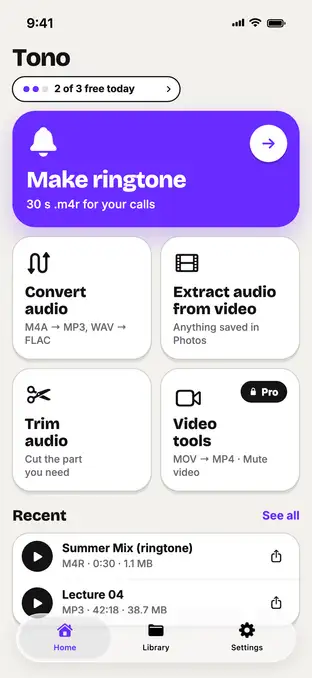
Fig. 1 — Home
Step 5: Extract audio as MP3
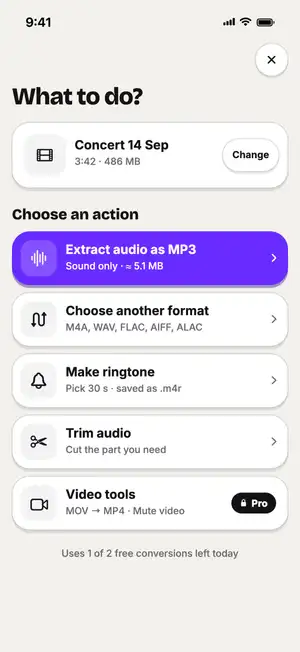
The expected size shows before you start.
Fig. 2 — 486 MB video → ≈ 5.1 MB MP3
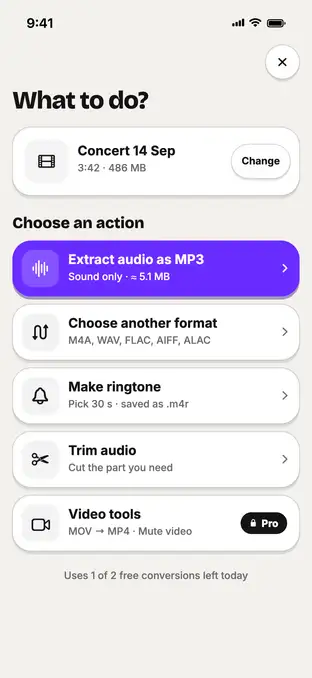
Fig. 2 — 486 MB video → ≈ 5.1 MB MP3
Step 6: Save to Files
The MP3 is saved in Files → On My iPhone → Tono and in the Library tab.
Free on-device M4A with Shortcuts
If M4A is enough, Apple’s Shortcuts app also converts without uploading. The setup takes two minutes — see how to extract audio from a video on iPhone.
Typical numbers
Typical values, not a test of one file: how much has to travel to a server when you convert online, versus the MP3 you actually need.
| Video (iPhone camera) | Upload for an online converter | MP3 · 192 kbps you get |
|---|---|---|
| 1 min · 1080p | ≈ 60 MB | ≈ 1.4 MB |
| 5 min · 1080p | ≈ 300 MB | ≈ 7.2 MB |
| 5 min · 4K | ≈ 850 MB | ≈ 7.2 MB |
Sources: CloudConvert — Security; FreeConvert — M4A to MP3; Apple — Change video recording settings on iPhone (per-minute sizes); Six Colors — Encode Media outputs M4A or AIF; Tono’s specs.
FAQ
Do online video-to-MP3 converters upload my video?
Yes — the conversion happens on their servers, so the file is uploaded first. Services publish how long they keep files; for example CloudConvert says it deletes them right after processing and FreeConvert says after 8 hours.
How can I tell if a converter app works offline?
Turn on Airplane Mode (with Wi-Fi off) and convert a short test file. If it finishes, the conversion runs on your iPhone. Also read the App Store privacy label under «App Privacy».
Is the Shortcuts app private?
Yes, the Encode Media action runs on the iPhone. It only outputs M4A or AIFF, not MP3.
Does Tono need an internet connection?
Not for converting. Video and audio conversion, trimming and ringtones run on the iPhone; your files aren't uploaded.
Is converting a video to MP3 legal?
Converting your own videos or files you have the rights to is fine. Don't convert copyrighted content you don't own or rip videos from streaming sites against their terms.