Tono · Guide
How to Convert M4A to MP3 on iPhone (Voice Memos, Songs, Recordings)
M4A is Apple's default audio format — Voice Memos, many recorders and downloads use it. When a website, car stereo or Android phone asks for MP3, here's how to convert it on the iPhone, with or without uploading the file.
On this page8 sections
Quick answer
On iPhone, use a converter app such as Tono: open the M4A from Files or Voice Memos, choose MP3 and save the result — it runs on the phone. Online converters (CloudConvert, FreeConvert) also work in Safari but upload the file. Renaming .m4a to .mp3 doesn't convert it.
- Voice Memos: Share → Save to Files, then convert the file.
- On the iPhone: a converter app, nothing uploaded.
- On a Mac: Music app → File → Convert → Create MP3 Version.
Your options
| Method | Where it runs | Good to know |
|---|---|---|
| Converter app (Tono) | On the iPhone | Nothing uploaded, size shown first |
| CloudConvert / FreeConvert | Their servers | Works in Safari, file is uploaded |
| Music app on a Mac | On the Mac | Create MP3 Version |
| Shortcuts | — | No MP3 output (M4A or AIFF only) |
Convert M4A to MP3 with Tono
Step 1: Open the M4A
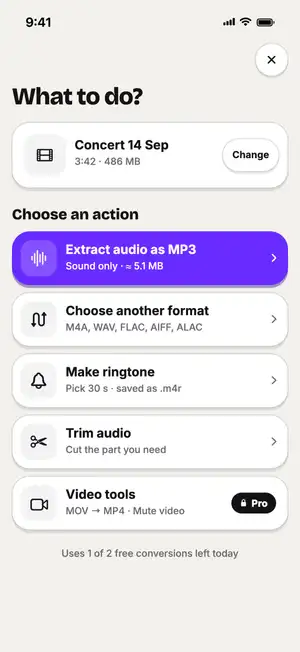
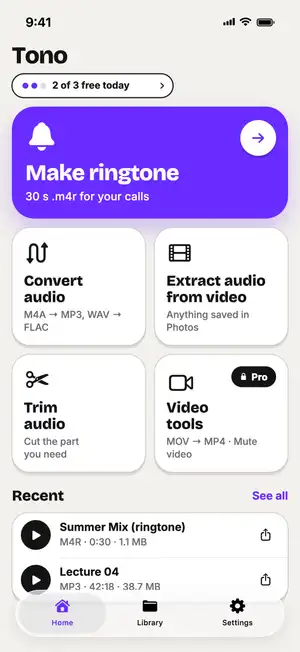
In Tono, tap Convert audio and pick the file from Files — or share the M4A to Tono from another app.
Step 2: Choose MP3 and quality
Pick MP3 and a quality. The size before and after shows up front — here a 7.8 MB voice memo becomes about 4.9 MB at 192 kbps.
Fig. 1 — 7.8 MB M4A → ≈ 4.9 MB MP3
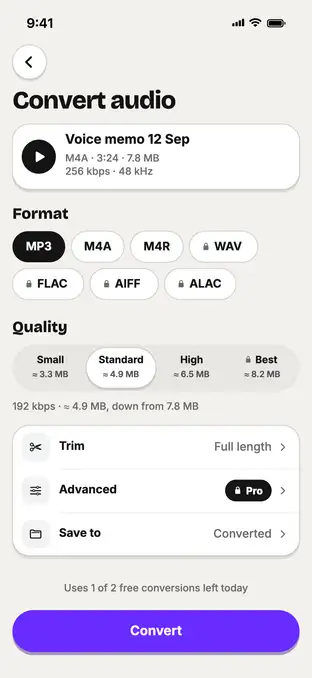
Fig. 1 — 7.8 MB M4A → ≈ 4.9 MB MP3
Step 3: Save or share
Save the MP3 to Files or share it. It also stays in the Library tab.
Converting a Voice Memo
Voice Memos keeps recordings inside its own app. Get the file out first:
Step 4: Save the memo to Files
In Voice Memos, tap the recording, tap ⋯ or the Share button and choose Save to Files.
Step 5: Convert the saved M4A
Open that file in Tono as above, or share the memo directly to Tono from the Share sheet.
Online converters
CloudConvert and FreeConvert convert M4A to MP3 in Safari without installing anything. Tap upload, choose the file from Files, convert and download the MP3.
Typical numbers
Typical values, not a test of one file: MP3 size per minute at each bitrate.
| MP3 bitrate | Size per minute | Good for |
|---|---|---|
| 128 kbps | ≈ 0.96 MB | Voice memos, lectures |
| 192 kbps | ≈ 1.4 MB | Music, plays anywhere |
| 320 kbps | ≈ 2.4 MB | Highest MP3 quality |
Sources: Apple — Convert music file formats in Music on Mac; CloudConvert — Security; FreeConvert — M4A to MP3; Six Colors — Encode Media outputs M4A or AIF; Tono’s format specs.
Troubleshooting
A song won't convert?
Apple Music downloads are protected (DRM) and can't be converted by any app.
Can't find the Voice Memo in Files?
Voice Memos doesn't show up in Files on its own — save it with Share → Save to Files first.
Upload stuck on a website?
Large files on mobile data upload slowly. Use Wi-Fi, or convert on the iPhone instead.
The player still won't play it?
Check the file really ends in .mp3 after converting — a renamed M4A will still fail.
FAQ
Is M4A better than MP3?
At the same bitrate, M4A (AAC) usually sounds a little better and is smaller. MP3 is more compatible — older car stereos, some Android apps and many websites accept only MP3.
Can I convert M4A to MP3 on iPhone for free?
Online converters like CloudConvert and FreeConvert have free tiers and work in Safari, but they upload your file. Tono converts on the iPhone with 3 free conversions a day of files up to 10 minutes.
Will converting M4A to MP3 lower the quality?
Slightly, because both formats are compressed and the sound is re-encoded. At 192 kbps or higher the difference is hard to hear for voice and most music.
Why doesn't renaming .m4a to .mp3 work?
The name changes but the audio inside stays AAC. Some players refuse the file or show an error.
Can I convert songs bought or streamed in Apple Music?
Apple Music subscription downloads are protected and can't be converted. Older iTunes Plus purchases can be converted in the Music app on a Mac.