Tono · Guide
How to Extract Audio from a Video on iPhone (MP3 or M4A, Free)
Want the song from a concert clip or the talk from a lecture video? iOS has no «save audio only» button, but you can build one for free with Shortcuts — or get an MP3 in two taps with Tono.
On this page7 sections
Quick answer
Free: make a shortcut in the Shortcuts app with the Encode Media action set to Audio Only, then run it from the Share button on a video — you get an M4A (or AIFF) file. It can't make MP3. For an MP3, use an app like Tono: pick the video, choose Extract audio as MP3 and save it to Files.
- Free, built in: Shortcuts → Encode Media → Audio Only → M4A or AIFF.
- MP3: Tono extracts it on your iPhone and shows the size first.
- GarageBand can't open videos — it imports audio files only.
What works on iPhone
Photos can trim a video, but it has no option to save the sound on its own. Here’s what each free Apple tool can and can’t do:
| Tool | Audio from a video? | Good to know |
|---|---|---|
| Shortcuts (Encode Media) | Yes · M4A or AIFF | Free, built in — no MP3 |
| GarageBand | No | Imports audio files only |
| Photos | No | Trims videos, no audio-only save |
| Mac Finder | Yes | Encode Selected Video Files → audio only |
So on the iPhone itself, the free route is a shortcut you set up once. If you need MP3, or want to see the size and trim the result, an app is simpler.
Method 1 — Free: a Shortcuts shortcut
You build it once (about two minutes), then it sits in the Share menu of every video.
Step 1: Create a new shortcut
Open Shortcuts, tap + and name it, for example «Extract Audio». In the shortcut's details, turn on Show in Share Sheet and set it to receive Media.
Step 2: Add Encode Media → Audio Only
Tap Add Action, search for Encode Media and add it. Expand its options and turn on Audio Only. Leave the format on M4A for a small file, or choose AIFF for uncompressed sound.
Step 3: Add Save File
Search for Save File and add it under Encode Media. When the shortcut runs, it asks where to save the audio — On My iPhone or iCloud Drive.
Step 4: Run it from a video
In Photos, open the video, tap the Share button and choose your shortcut. The audio file appears in the Files app where you saved it.
Want a ringtone rather than a song file? The M4A from this shortcut imports into GarageBand — see how to make a ringtone on iPhone.
Method 2 — Tono: MP3 in two taps
Tono takes the sound out of any video from Photos or Files and saves it as MP3 — or M4A, WAV, FLAC, AIFF or ALAC. Everything runs on your iPhone; nothing is uploaded.
Step 1: Tap Extract audio from video
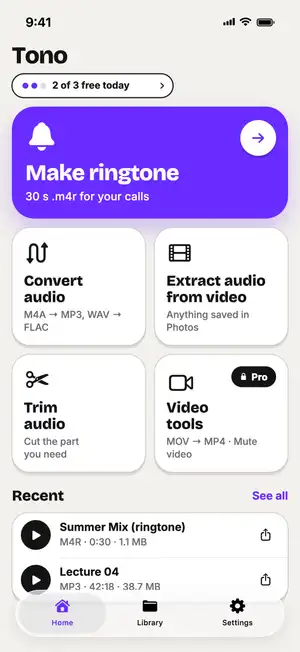
Open Tono and tap Extract audio from video on the home screen, then pick the video.
Fig. 1 — Home: Extract audio from video
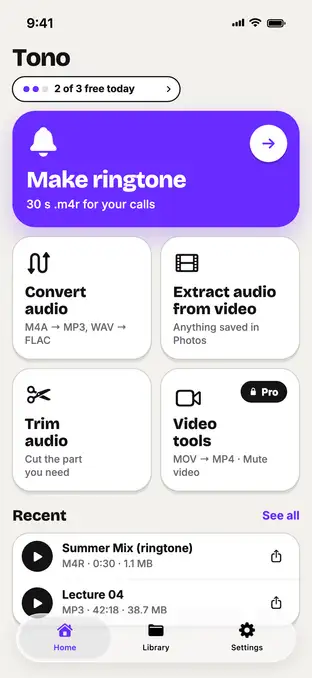
Fig. 1 — Home: Extract audio from video
Step 2: Or share the video to Tono
From Photos, Files or another app, share the video to Tono. It asks what to do — Extract audio as MP3 is the first option, with the size up front: here a 486 MB concert video becomes about 5.1 MB of sound.
Fig. 2 — 486 MB video → ≈ 5.1 MB MP3
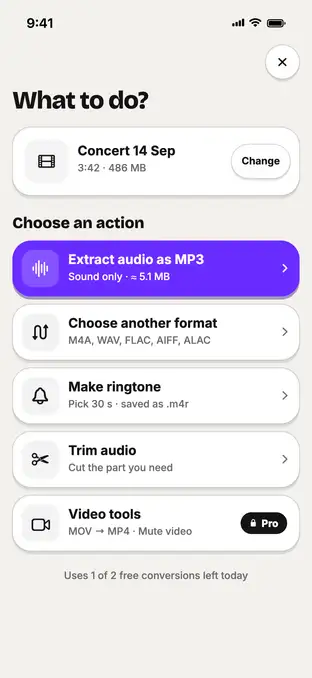
Fig. 2 — 486 MB video → ≈ 5.1 MB MP3
Step 3: Convert and save
Keep MP3 or pick another format and quality — the expected size updates before you start. When it's done, save or share the file. It's also in the Library tab and in Files → On My iPhone → Tono.
Already use our Video Compressor? It can save a video’s sound too: tap Audio, pick the video, and you get an M4A you can trim with handles before saving it to Files. Free up to 128 kbps; WAV, AIFF and lossless are Premium.
Step 4: Alternative: Video Compressor → Audio
The result screen shows the format, bitrate and size — here a 0:42 clip is 616 kB as M4A at 128 kbps — with Trim, Save to Files and Share.
Fig. 3 — Video Compressor: M4A with trim
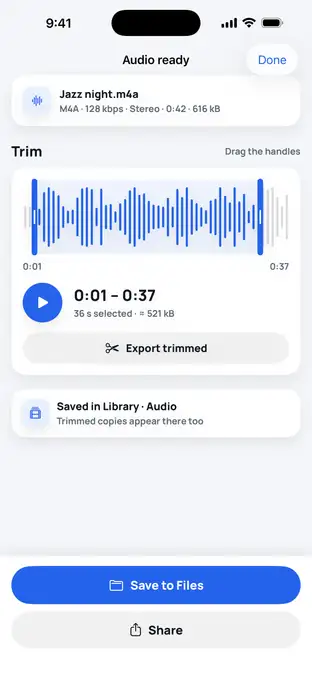
Fig. 3 — Video Compressor: M4A with trim
Typical numbers
These are typical values, not a measurement of one file: how big a minute of extracted sound is in each format. Lossy formats are simple maths — bitrate × time — so a 10-minute talk at 128 kbps is about 9.6 MB, whatever the size of the video.
| One minute of stereo sound | Size | Good for |
|---|---|---|
| M4A or MP3 · 128 kbps | ≈ 0.96 MB | Talks, podcasts, voice |
| MP3 · 192 kbps | ≈ 1.4 MB | Music — Tono's top free quality |
| MP3 · 320 kbps | ≈ 2.4 MB | Highest MP3 quality (Tono Pro) |
| AIFF or WAV · 16-bit | ≈ 10.6 MB | No loss, for editing |
That’s why the sound is so small next to the video: the 486 MB, 3:42 concert clip in Fig. 2 carries about 5 MB of audio at 192 kbps.
Sources: Apple — Import audio and MIDI files into GarageBand for iPhone; Apple — Automation tips in QuickTime Player on Mac (Encode Selected Video Files); How-To Geek — extract audio from a video file on iPhone; Six Colors — Encode Media encodes audio only to M4A or AIF; Matthew Cassinelli — Encode Media action; Tono’s and Video Compressor’s format specs.
Troubleshooting
«This video has no sound»?
Some clips — screen recordings with the mic off, muted videos — have no audio track at all. There's nothing to extract; check the video plays with sound in Photos.
Shortcut not in the Share menu?
Open the shortcut's details and make sure Show in Share Sheet is on and it accepts Media. Then scroll to the end of the share sheet's action list.
Can't find the file?
Open the Files app and check Recents. Tono saves to On My iPhone → Tono; the shortcut saves wherever you chose when it ran.
Video takes long to load?
If it's stored in iCloud, the full video downloads first. Stay on Wi-Fi until it's on the iPhone.
FAQ
Can I extract audio from a video on iPhone without an app?
Yes, with Apple's Shortcuts app, which is built into iOS. A three-action shortcut with Encode Media set to Audio Only saves the sound of a video as an M4A or AIFF file. It can't create MP3.
Can GarageBand take the sound from a video?
No. GarageBand for iPhone imports AIFF, WAV, AAC, MP3 and Apple Loops — audio files only. Extract the sound first (for example as M4A with Shortcuts), then import that file.
Is M4A or MP3 better?
At the same bitrate, M4A (AAC) often sounds a little better and plays on every Apple device. MP3 is the safest choice for old car stereos, some Android apps and websites that only accept MP3.
Does extracting audio lower the quality?
Converting to MP3 or M4A re-encodes the sound, but at 192 kbps the difference from the video's original soundtrack is usually hard to hear. For no loss at all, use a lossless format like WAV or AIFF — the files are about ten times bigger.