Tono · Guide
How to Convert MP4 to MP3 on iPhone (Free and Offline Options)
iPhone has no built-in MP4-to-MP3 button — and the free Shortcuts trick makes M4A, not MP3. Here's what actually gives you an MP3, which settings to use, and what to expect for size and quality.
On this page7 sections
Quick answer
Apple's own apps can't make an MP3 on iPhone: Shortcuts outputs M4A or AIFF only. To get a real MP3, use a converter app such as Tono — open the MP4 or MOV, choose Extract audio as MP3 and save it to Files. Online converters also work, but they upload your video to their servers.
- Free built-in route: M4A only (Shortcuts → Encode Media → Audio Only).
- Real MP3 on the iPhone: a converter app, 192 kbps is plenty.
- Renaming .mp4 to .mp3 doesn't convert anything.
Your options on iPhone
| Method | Gives MP3? | Good to know |
|---|---|---|
| Shortcuts (Encode Media) | No · M4A or AIFF | Free, built in |
| Converter app (Tono) | Yes | On the iPhone, size shown first |
| Online converter | Yes | Uploads the video to a server |
| Mac Music app | Yes, for audio files | File → Convert → Create MP3 Version |
If M4A is fine for you, the free Shortcuts method is in how to extract audio from a video on iPhone. If you need an actual MP3 — for a car stereo, an Android phone or a website that only takes MP3 — use a converter.
Convert MP4 to MP3 with Tono
Step 1: Open the MP4 or MOV
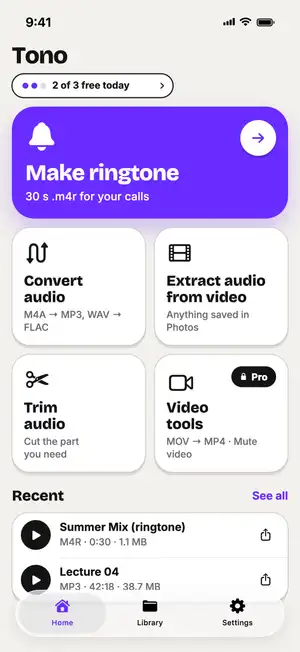
In Tono, tap Extract audio from video and pick the video from Photos or Files. Or share the video to Tono from another app.
Fig. 1 — Home: Extract audio from video
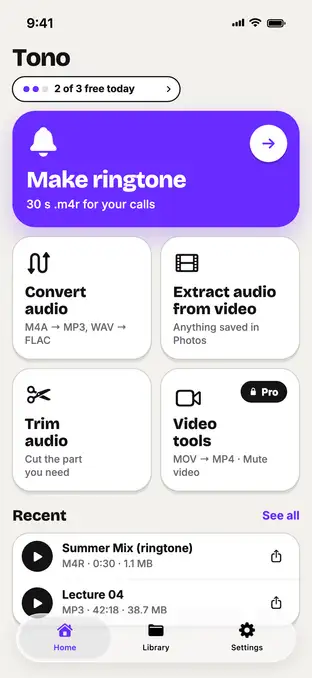
Fig. 1 — Home: Extract audio from video
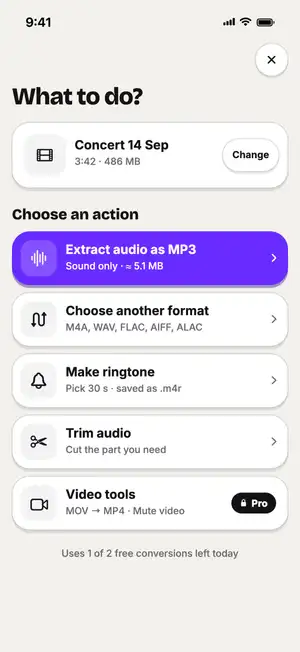
Step 2: Choose Extract audio as MP3
It's the first option, with the expected size shown before you start.
Fig. 2 — 486 MB MP4 → ≈ 5.1 MB MP3
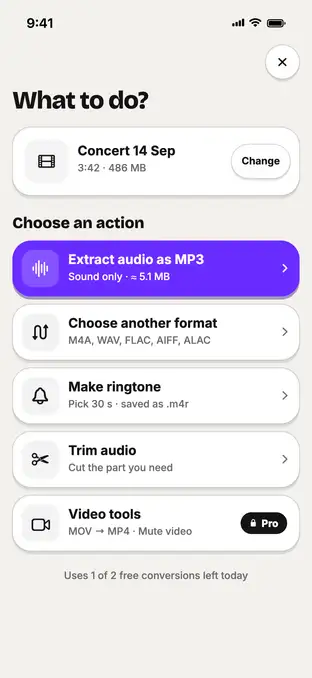
Fig. 2 — 486 MB MP4 → ≈ 5.1 MB MP3
Step 3: Save the MP3
Save it to Files or share it straight to another app. It also stays in the Library tab.
Which bitrate to pick
The bitrate decides quality and size. The sound inside a video is already compressed (usually AAC), so a very high MP3 bitrate makes the file bigger without making it sound better.
- 128 kbps — speech, lectures, podcasts.
- 192 kbps — music; most people can’t tell it from the original.
- 320 kbps — highest MP3 quality, for archiving music.
Typical numbers
Typical values, not a test of one file. MP3 size depends only on bitrate and length — not on how big the MP4 was.
| Length of the video | MP3 · 128 kbps | MP3 · 192 kbps |
|---|---|---|
| 1 minute | ≈ 0.96 MB | ≈ 1.4 MB |
| 5 minutes | ≈ 4.8 MB | ≈ 7.2 MB |
| 10 minutes | ≈ 9.6 MB | ≈ 14.4 MB |
| 60 minutes | ≈ 58 MB | ≈ 86 MB |
Sources: Six Colors — Encode Media encodes audio only to M4A or AIF; Apple — Convert music file formats in Music on Mac; FreeConvert — M4A to MP3 (files deleted after 8 hours); CloudConvert — Security (files deleted after processing); Tono’s format specs.
Troubleshooting
The MP3 has no sound?
The video itself may be silent — a screen recording with the microphone off, or a muted clip. Check it plays with sound in Photos.
A movie won't convert?
Purchased or rented movies are protected (DRM) and can't be converted by any app.
Opening the video is slow?
It's in iCloud and downloads first. Stay on Wi-Fi until it's on the iPhone.
Where is the MP3?
Files → Recents, or On My iPhone → Tono.
FAQ
Can iPhone convert MP4 to MP3 without an app?
Not to MP3. The built-in Shortcuts app can save the sound of a video as M4A or AIFF, but it has no MP3 option. M4A plays on Apple devices and most modern players.
Is MOV the same as MP4 for converting?
For getting the sound out, yes. iPhone camera videos are usually MOV; a converter treats MOV and MP4 the same way and gives you an MP3.
Can I just rename the file from .mp4 to .mp3?
No. Renaming changes only the name — the file is still a video, and most players will refuse it or play nothing.
Do online MP4-to-MP3 converters keep my video?
They upload it to their servers to convert it. Services say how long they keep files — for example, FreeConvert says files are deleted after 8 hours and CloudConvert says right after processing. For private videos, convert on the iPhone instead.
What bitrate should I use for MP3?
192 kbps sounds good for music and voice and keeps files small. 320 kbps is the highest MP3 quality; 128 kbps is fine for speech.