Tono · Guide
Video to Audio on iPhone — MP3, M4A or WAV, and Which to Pick
A video is just pictures plus a soundtrack. On iPhone you can keep only the soundtrack as an audio file — the hard part is choosing the format and getting the video out of Photos, Files or a chat app first. Here's how, step by step.
On this page8 sections
Quick answer
Pick the format first: MP3 plays everywhere, M4A is smaller at the same quality and native to Apple, WAV is lossless but about ten times bigger. Free on iPhone: a Shortcuts shortcut with Encode Media → Audio Only gives M4A. For MP3 or WAV, an app like Tono converts the video on the iPhone and shows the size before you start.
- MP3 — for any player, car stereo, Android or website.
- M4A — smaller files, best for Apple devices.
- WAV — no quality loss, for editing; about 10 MB per minute.
Which format to choose
The format matters more than the app. All three keep the same sound — they differ in size and where the file will play.
| Format | Plays on | Choose it when |
|---|---|---|
| MP3 | Everything | Car stereos, Android, websites, old players |
| M4A (AAC) | Apple devices, most players | Smallest file at good quality |
| WAV / AIFF | Editors, computers | No loss — for editing; big files |
Not sure? Pick MP3 at 192 kbps — it plays anywhere and sounds fine for music and voice.
Get the video onto your iPhone first
Converters work with videos stored on the iPhone. Where your video is decides the first step:
- Photos (camera, screen recordings, saved clips) — ready to use.
- Files or iCloud Drive — ready to use; if it shows a cloud icon, tap it once to download.
- WhatsApp or Telegram — open the video, tap Share or Save, and save it to Photos or Files.
- AirDrop or Mail — save the attachment to Files.
Free: M4A with Shortcuts
The Shortcuts app can keep the sound of a video as M4A. You build the shortcut once, then it sits in the Share menu of every video.
Step 1: Create the shortcut
Open Shortcuts, tap + and name it «Video to Audio». In its details, turn on Show in Share Sheet and set it to receive Media.
Step 2: Add Encode Media → Audio Only
Add the Encode Media action, expand it and turn on Audio Only. Keep M4A for a small file.
Step 3: Add Save File and run it
Add Save File, then share a video from Photos to the shortcut. The M4A appears in Files where you chose to save it.
MP3, M4A or WAV with Tono
Tono converts a video to MP3, M4A, WAV, FLAC, AIFF or ALAC on your iPhone. You see the size before you convert, and nothing is uploaded.
Step 1: Open the video in Tono
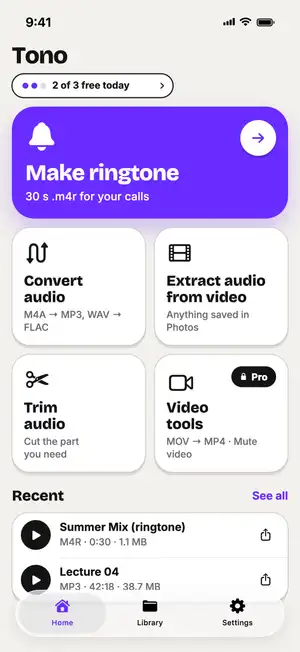
Tap Extract audio from video and pick the video — or share it to Tono from Photos, Files or a chat app.
Step 2: Choose the format
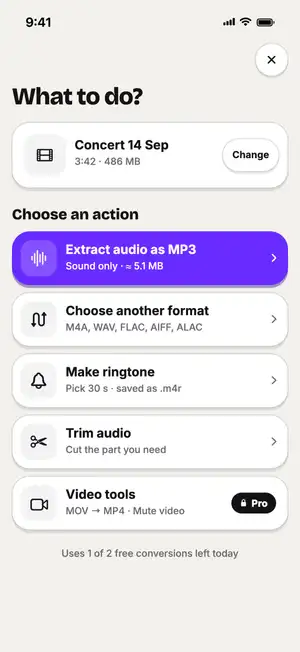
Extract audio as MP3 is the first option. Tap another format to switch; the expected size updates as you change it.
Fig. 1 — 486 MB video → ≈ 5.1 MB MP3
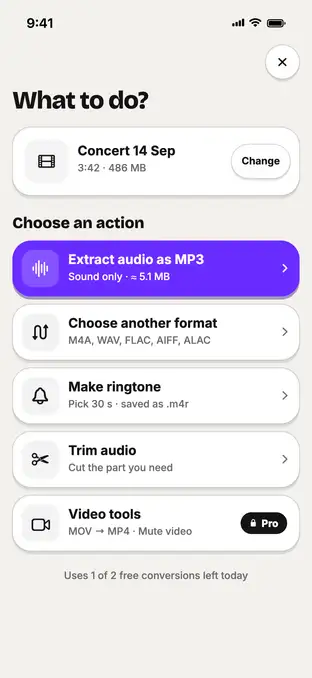
Fig. 1 — 486 MB video → ≈ 5.1 MB MP3
Step 3: Save or share
When it finishes, save the file to Files or share it. Results are also kept in the Library tab.
Several videos? Pick them all and convert with one setting — the queue keeps going if you leave the app.
Step 4: Batch: many videos, one setting
Select several files, choose the format once and convert them together.
Fig. 2 — Batch convert (Tono Pro)
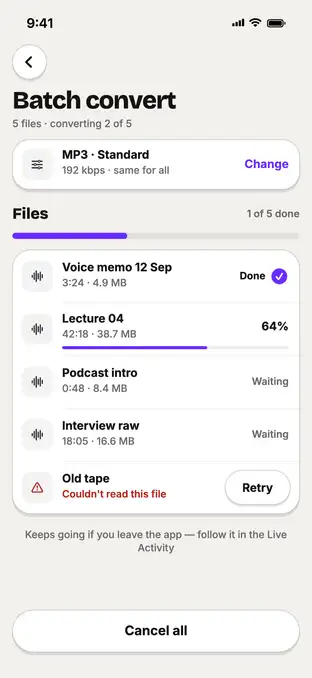
Fig. 2 — Batch convert (Tono Pro)
Typical numbers
Typical values, not a test of one file: how big one minute of sound is after conversion. The video’s size doesn’t matter — only the audio format and bitrate do.
| One minute of stereo sound | Size | Good for |
|---|---|---|
| M4A · 128 kbps | ≈ 0.96 MB | Voice, podcasts, Apple devices |
| MP3 · 192 kbps | ≈ 1.4 MB | Music, plays anywhere |
| MP3 · 320 kbps | ≈ 2.4 MB | Highest MP3 quality |
| WAV · 16-bit | ≈ 10.6 MB | Editing, no loss |
So a 5-minute video becomes about 7 MB of MP3 at 192 kbps — or about 53 MB of WAV.
Sources: Six Colors — Encode Media encodes audio only to M4A or AIF; Matthew Cassinelli — Encode Media action; How-To Geek — extract audio from a video file on iPhone; Tono’s format specs.
Troubleshooting
The audio file is silent?
The video may have no sound track — screen recordings with the microphone off, or muted clips. Play the video in Photos first.
Video takes a long time to open?
It's stored in iCloud and downloads first. Stay on Wi-Fi until it's on the iPhone.
Can't find the audio file?
Open Files → Recents. Tono saves to On My iPhone → Tono; Shortcuts saves where you chose when it ran.
App doesn't accept the file?
Protected (DRM) videos, like purchased movies, can't be converted.
FAQ
Can I convert a video to audio on iPhone without an app?
Yes. The Shortcuts app, built into iOS, can save the sound of a video as M4A or AIFF using the Encode Media action with Audio Only turned on. It can't make MP3 or WAV.
Which audio format should I choose?
MP3 if the file has to play everywhere (old car stereos, Android, websites). M4A for the smallest file at good quality on Apple devices. WAV or AIFF if you'll edit the sound and want no quality loss.
Can I convert several videos to audio at once?
Not with the free Shortcuts method without extra setup. Tono can convert several files in one go with one setting; batch conversion is part of Tono Pro.
Does converting video to audio delete the video?
No. You get a new audio file; the original video stays in Photos or Files.
Can I convert a YouTube or TikTok video to audio?
Only videos saved on your iPhone can be converted. Downloading other people's videos from streaming sites is usually against their terms — use your own clips or ones you have the rights to.