Video Compressor · Guide
How to Send a Large Video from iPhone: Email, Discord, Telegram & iMessage
Mail, Gmail, Discord, Telegram and iMessage all cap video size differently. Here are the limits, the free ways around them, and how to make a video fit any of them on the first try.
On this page7 sections
Quick answer
Nearby? Use AirDrop — Apple's simplest way to send a large video, in full quality. By email, Apple Mail's Mail Drop sends up to 5 GB as a download link. Telegram takes files up to 2 GB. Gmail stops at 25 MB and a free Discord account at 20 MB — for those, compress the video to a size just under the limit.
- Nearby: AirDrop to an iPhone, iPad or Mac — no size limit listed.
- Big files: Mail Drop up to 5 GB, Telegram up to 2 GB (4 GB with Premium).
- Small caps: Gmail 25 MB, Discord 20 MB — compress to fit.
Size limits by app
A minute of 4K from an iPhone can be several hundred MB, so most videos are too big for at least one of these. The limit depends on the app and on how you send it:
| Where you send it | Limit | Good to know |
|---|---|---|
| AirDrop | No set limit | Nearby Apple devices, original file |
| Apple Mail · Mail Drop | 5 GB | Sent as a link, works for 30 days |
| Gmail attachment | 25 MB | Bigger files become a Drive link |
| Discord (free account) | 20 MB | Nitro raises the limit |
| Telegram | 2 GB | 4 GB with Telegram Premium |
| iMessage | Varies | Large videos may be sent smaller |
| WhatsApp chat | 16 MB | Up to 2 GB as a document |
The trick is to match the method to the destination: send the original where the limit is huge, and compress only where it’s small.
Method 1 — Free: AirDrop, Mail Drop and send as a file
No extra app needed. Each of these keeps the original quality.
Step 1: Nearby? Use AirDrop
Open the video in Photos → Share → AirDrop → pick the person. Apple calls it the simplest way to send a large video to a nearby iPhone, iPad or Mac. To send the original file with its metadata and location, tap Options first and turn on All Photos Data. Both devices need Wi-Fi and Bluetooth on.
Step 2: Email it with Mail Drop
In Photos tap Share → Mail. If the message is bigger than your email provider allows, Mail asks whether to send the attachment with Mail Drop: the video goes up to iCloud and the recipient gets a download link that works for 30 days. Up to 5 GB, and it doesn't count against your iCloud storage.
Step 3: Telegram: send it as a file
In a chat tap the paperclip, switch to File and choose the video. Files up to 2 GB (4 GB with Premium) go through as they are; sent as a regular video, Telegram compresses it for playback.
Step 4: Share a cloud link
Save the video to iCloud Drive in the Files app, or to another cloud drive, and share a link to it. A link works in any chat, email or Discord, whatever the size.
For WhatsApp in particular, see our guide on how to compress a video for WhatsApp.
Method 2 — Video Compressor: exact size for each app
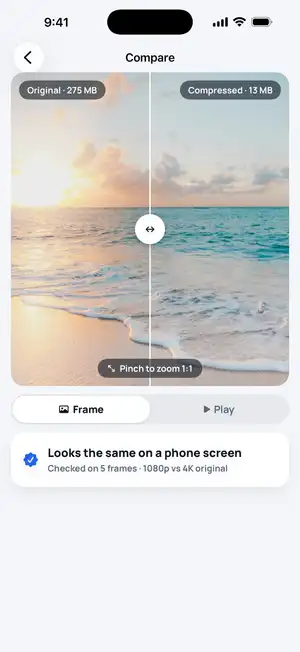
Video Compressor shrinks the video on your iPhone and aims just under the limit of the app you pick. Your original stays in Photos.
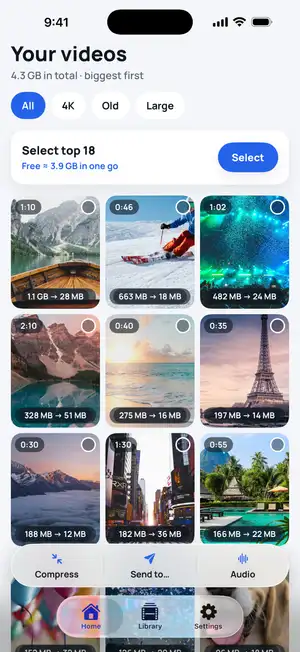
Step 1: Pick the video
Open Video Compressor and tap the video — newest come first. Or tap Send to… in the bottom bar to pick it straight from Photos.
Fig. 1 — Pick the video
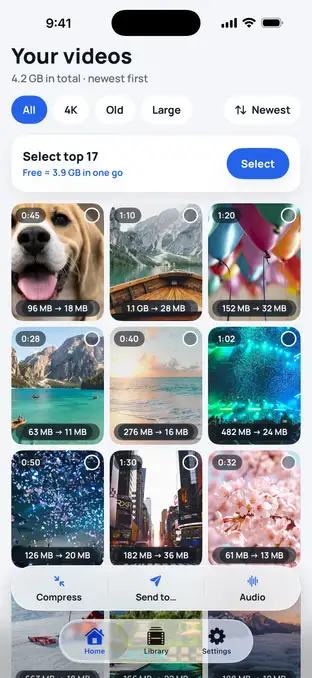
Fig. 1 — Pick the video
Step 2: See the expected size
Before anything happens, the app shows how small the video will get and why — here 1.1 GB of 4K becomes about 28 MB.
Fig. 2 — Expected size first
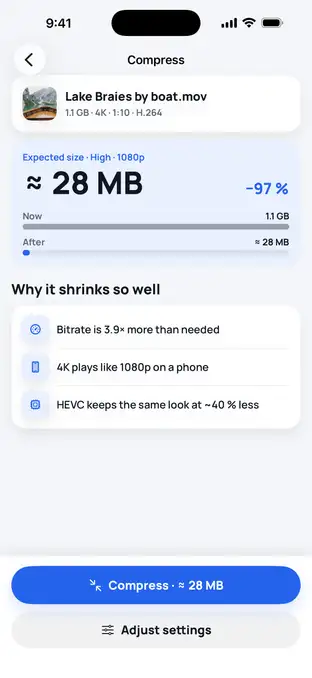
Fig. 2 — Expected size first
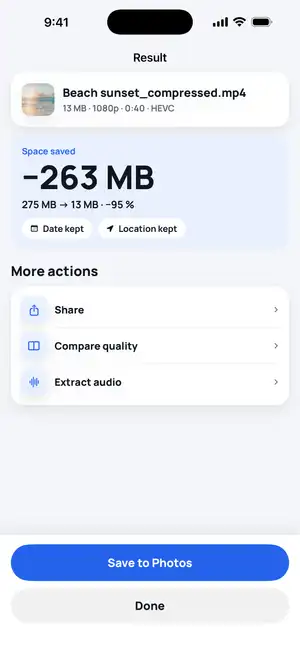
Step 3: Send to → choose the app
Choose where it goes: WhatsApp (16 MB), Email (25 MB), Discord (10 MB — well inside the free 20 MB), Telegram or iMessage — or set your own size in MB. The app aims just under that size and shows whether it fits. Then tap Share and pick the app.
Fig. 3 — Result: fits the limit
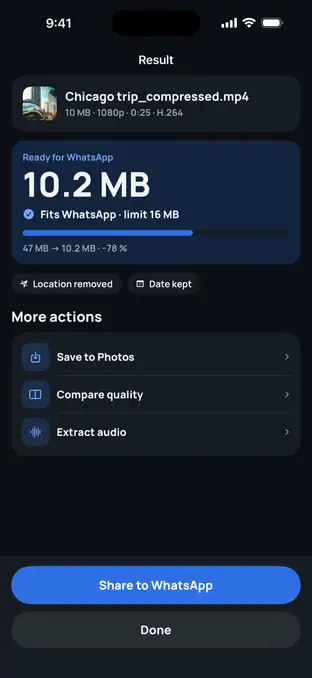
Fig. 3 — Result: fits the limit
Typical numbers
These are typical values, not a test on one phone. A minute of 4K at 30 fps is about 170 MB by the iPhone’s own estimate, so here is where a typical one-minute 4K clip goes as it is — and how small it has to get for the rest.
| One-minute 4K 30 fps clip | Size | Result |
|---|---|---|
| Original | ≈ 170 MB | Over Gmail, Discord and WhatsApp chat limits |
| AirDrop or Mail Drop | ≈ 170 MB | Goes as is (Mail Drop: up to 5 GB, link for 30 days) |
| Telegram as a file | ≈ 170 MB | Goes as is (up to 2 GB) |
| Gmail attachment | ≤ 25 MB | About 7 times smaller than the original |
| Discord, free account | ≤ 20 MB | About 8–9 times smaller (Video Compressor aims at 10 MB) |
Sources: per-minute size as listed under Settings → Camera → Record Video, reproduced by Gadget Hacks; Apple — Mail Drop limits; Apple — Share long videos on iPhone; Gmail Help — attachment size limit; Discord — File Attachments FAQ; Telegram FAQ.
Troubleshooting
No Mail Drop option?
Mail Drop is part of iCloud and works in Apple Mail and on iCloud.com, not in the Gmail or Outlook apps. Mail only offers it when the message is over your provider's limit. In other mail apps, share a cloud link instead.
Blurry on the other end?
Messengers re-compress videos sent as a «video». Send it as a file (Telegram, WhatsApp document) or by AirDrop to keep every pixel.
Stuck on «Preparing»?
If the video is stored in iCloud, the full file downloads first. Stay on Wi-Fi and keep the app open until it starts.
Too long to fit 20 MB?
A few minutes of video can't fit Discord's 20 MB in watchable quality. Trim it to the part that matters, or share a link.
FAQ
What's the biggest video I can email from iPhone?
With a regular attachment, usually about 20–25 MB, depending on the email provider. Apple Mail can send bigger files with Mail Drop — up to 5 GB as a link that works for 30 days.
Why does my video look blurry after sending it in Messages?
Messages may send a smaller version of a large video, especially with Low Quality Image Mode on (Settings → Apps → Messages). For full quality, use AirDrop when you're nearby, or Mail Drop or a cloud link instead.
How do I send a video on Discord without Nitro?
Free accounts can upload files up to 20 MB (the limit was 10 MB until August 2026). Compress the video to just under the limit, trim it, or upload it to a cloud drive and paste the link.
Does Video Compressor upload my video to send it?
No. It compresses the video on your iPhone and hands the smaller file to the app you choose through the normal share sheet.